Note:
This article is marked as incomplete.
Shapes
Overview
This documentation specifies methods of the hsa.Console class which are used to draw shapes.
The documentation on rectangle based methods can be found here.
Shapes
Arcs
void hsa.Console.drawArc(int x, int y, int width, int height, int startAngle, int arcAngle)
Draws an arc. The arc is inscribed in the rectangle defined by the upper left corner at (x, y) with width of width and height of height. It starts at startAngle degrees and goes counterclockwise for arcAngle degrees.
void hsa.Console.drawOval(int x, int y, int width, int height)
Draws an ellipse. The ellipse is inscribed in the rectangle defined by the upper-left corner (x, y) with width of width and height of height.
void hsa.Console.drawLine(int x1, int y1, int x2, int y2)
Draws a line from (x1, y1) to (x2, y2).
Designs
void hsa.Console.drawStar(int x, int y, int width, int height)
Draws a star. The star is inscribed in the rectangle defined by the upper-left corner (x, y) with width of width and height of height.
void hsa.Console.drawMapleLeaf(int x, int y, int width, int height)
Draws a maple leaf. The maple leaf is inscribed in the rectangle defined by the upper-left corner (x, y) with width of width and height of height.
Regular Shapes
void hsa.Console.drawPolygon(int[] xPoints, int[] yPoints, int numPoints)
Draws a polygon. The xPoints and yPoints arrays define the coordinates of the array of vertices. numPoints specifies the number of vertices in the polygon.
Putting It Together
import hsa.Console; // or import hsa.*;
import java.awt.Color; // or import java.awt.*;

public class Main {

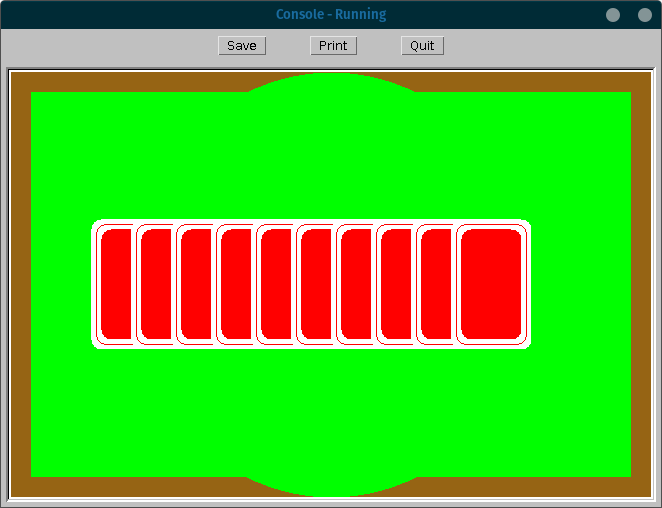
    // draws a playing card table with a stack of cards in the middle
    public static void main(String[] args) {
        Console c = new Console();

        // the width and height in pixels of the console window
        int width = c.getWidth();
        int height = c.getHeight();

        // draw a brown background
        c.setColour(new Color(150, 100, 20));
        c.fillRect(0, 0, width, height);

        // draw green middle
        c.setColour(Color.GREEN);
        c.fillRect(20, 20, width-40, height-40);

        // draw green cutouts in the border
        c.fillOval(width/2-200, 0, 400, height);

        // number of cards to be drawn in the middle of the table
        int numberOfCards = 10;

        // draw a stack of playing cards
        for (int cardNumber = 0; cardNumber < numberOfCards; cardNumber++) {
            drawPlayingCard(c, width/2-(numberOfCards/2-cardNumber)*40, height/2);
        }
    }

    public static void drawPlayingCard(Console c, int x, int y) {
        // draw white card background
        c.setColour(Color.WHITE);
        c.fillRoundRect(x-40, y-65, 80, 130, 20, 20);
        // draw red card middle
        c.setColour(Color.RED);
        c.drawRoundRect(x-35, y-60, 70, 120, 20, 20);
        c.fillRoundRect(x-30, y-55, 60, 110, 20, 20);
    }
}
Output:
What Next?
hmmm…
Check out the documentation on drawing text with hsa.Console here.